
NIS2 supplier security assessment — without spreadsheets going round by email
New module: you send a supplier a security questionnaire from your system, they complete it in a portal (2FA login) and attach evidence — policies, certificates, reports. The result returns to the assessment order with a full history of who answered what, and when.
Where the obligation comes from
NIS2 extends security responsibility to the supply chain. Essential and important entities must manage supplier risk — and that obligation flows down to their suppliers and service providers. Risk-management measures include supply-chain security and the security of relationships with direct suppliers (Directive (EU) 2022/2555, Article 21(2)(d)).
It complements our ISO and NIS2 Portal; we cover the regulation itself in the article on NIS2 and the EU Machinery Regulation.
How it works — four steps
- You create an assessment order — pick the supplier, a questionnaire template for their industry and a deadline. The checklist is built from the template.
- The portal sends an invitation — the supplier gets an email with a one-time link, creates an account, sets their own password and a second factor (authenticator app). We never email passwords.
- The supplier fills in the questionnaire — answers save as they go (they can pause and return). For mandatory questions a 'no' answer requires an explanation, and where indicated — an attached evidence file.
- The result returns to the order — answers and documents land in the order checklist and the status changes to 'to review'. You see which mandatory requirements are unmet.
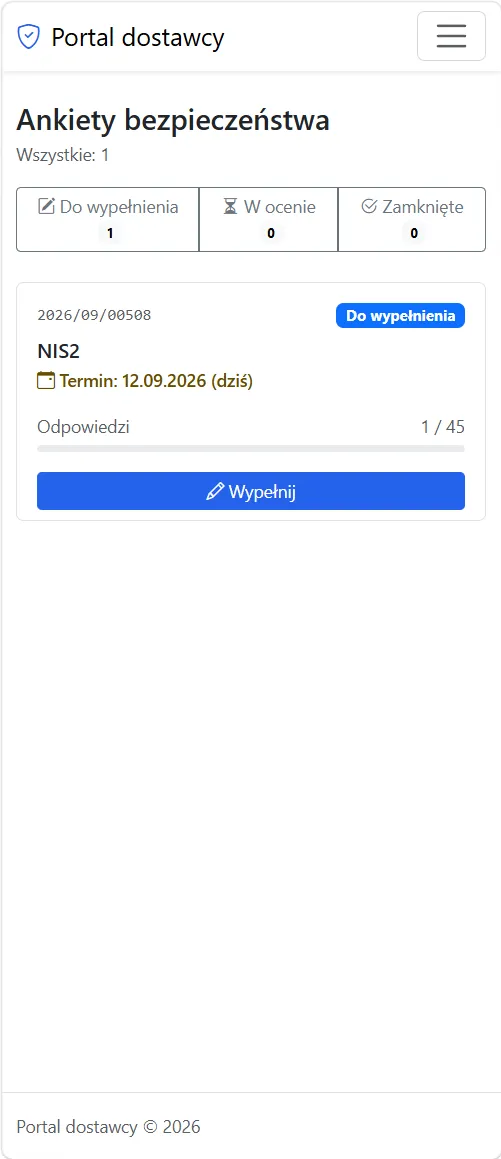
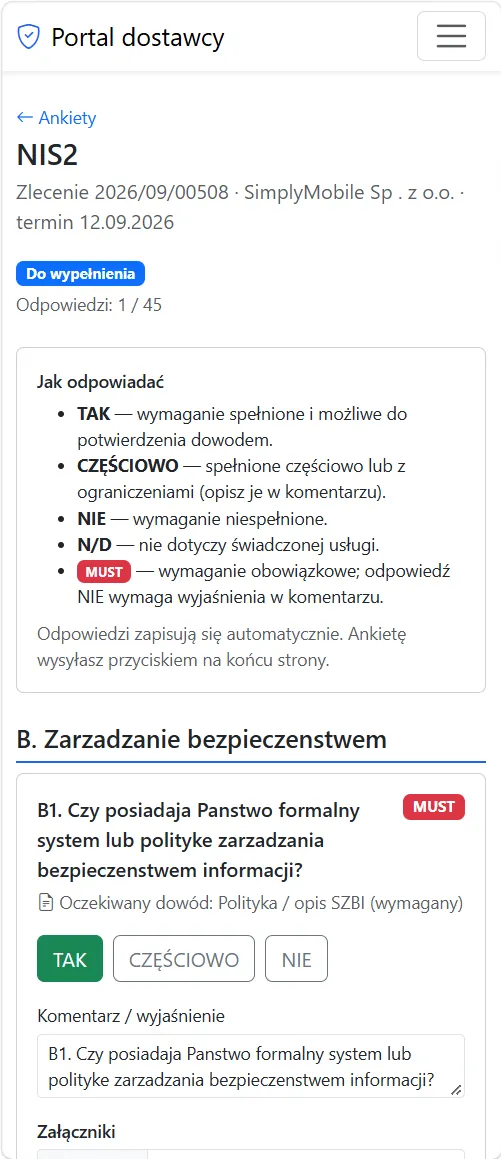
This is the supplier portal
After logging in (2FA), the supplier sees only their own questionnaires, their status and deadline — on a phone too. Progress ('1 / 45') is visible at a glance.
For each question they answer YES / PARTIALLY / NO / N/A, add a comment and attach evidence. Mandatory (MUST) questions must be explained, and answers save automatically.
What you get
- Templates per industry — separate question sets for IT, service and manufacturing suppliers; mark questions as mandatory, evidence-required or internal (the supplier does not see internal ones).
- Evidence in one place — policies, certificates and reports sit next to the specific question, not in email attachments; each file goes through type checks and an antivirus scan.
- Mandatory requirements — gaps in key areas (MFA, incident response, backups) are visible at once, with the supplier's explanation.
- Follow-ups without starting over — the assessor asks about a specific answer; the supplier updates only that point.
- Deadline reminders — the portal nudges the supplier before the deadline, so you do not track it in a calendar.
- History and audit — a record of logins, answer changes and uploaded files; at the next assessment you see what changed.
- Final assessment — inherent and residual risk, an acceptance decision and remediation actions with a due date and owner.
- No double data entry — suppliers, orders and statuses come from your system; the portal is not a separate contractor database.
Portal security
Since we ask suppliers about access control and encryption, the supplier portal is held to the same bar — it is a separate application and we built it that way:
- Two-factor login (2FA) with no exceptions — an account without a second factor sees no data.
- Separated environments — the portal runs on a different domain than the internal system, with minimal database permissions.
- Each supplier sees only itself — an account is tied to one company, with no path to other suppliers' data.
- Files under control — allowed formats, content verification, a size limit and an antivirus scan before assessors can see them.
- One-time invitations — the link works once and expires; we store only its hash, never passwords in messages.
- Full audit trail — logins, failed attempts, answer changes and file operations with date, user and IP.
Want to see it on your own suppliers? In a demo we set up an assessment for a chosen supplier and walk the path from invitation to result. Book a free demo.
This functionality supports meeting NIS2 obligations for supply-chain security. It does not replace legal analysis or the decision on entity classification.
Frequently asked questions
- What is supplier security assessment under NIS2?
It is part of the supply-chain risk management required by the NIS2 Directive (EU 2022/2555, Article 21(2)(d)). Essential and important entities must assess the security of their suppliers and service providers — our module organizes this: questionnaire, evidence, assessment and history.
- Who has to assess suppliers?
Primarily entities in scope of NIS2 (essential and important). In practice the obligation also flows down to suppliers, who are asked to complete security questionnaires by their clients.
- Does the supplier have to create an account and 2FA?
Yes. The supplier gets a one-time link, creates an account, sets their own password and a second factor (authenticator app). Without configured 2FA the account sees no data. We never email passwords.
- What evidence can be attached?
Policies, certificates (e.g. ISO 27001), reports and other documents — attached to the specific question. Every file goes through type checks and an antivirus scan.
- How does this differ from the ISO and NIS2 Portal?
The ISO and NIS2 Portal organizes your internal documentation and compliance. Supplier assessment concerns the security of companies in your supply chain — two complementary areas of NIS2.
See SimplyMobile in action
Book a free, no-obligation demo — we'll show the system on your own processes.