






Maintenance · CMMS / EAM

Mobile CMMS that cuts downtime

Organize work orders, inspections and spare parts in one system — with mobile work on the floor and KPIs (OEE, MTTR, MTBF) that really cut downtime.

  • Cloud or on‑premise deployment
  • Mobile app (works offline)
  • Implementation support
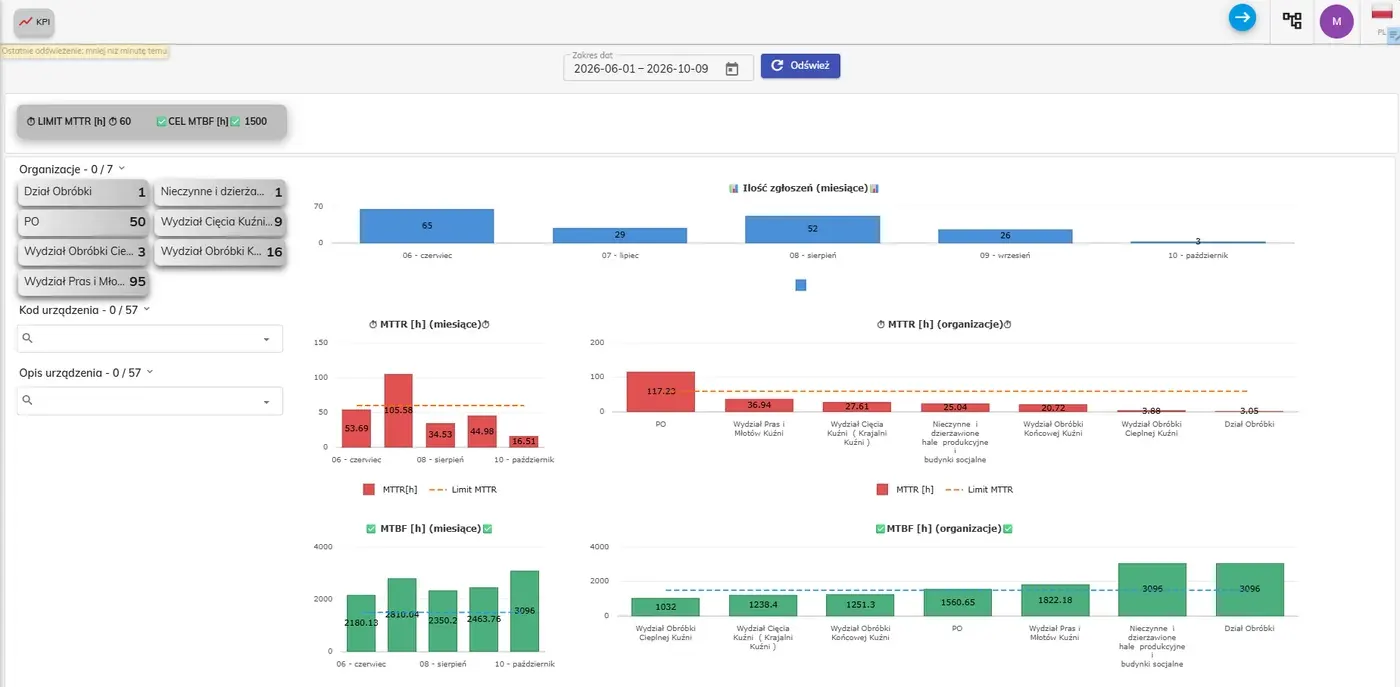
SimplyMobile CMMS maintenance KPI dashboard — MTTR and MTBF with targets
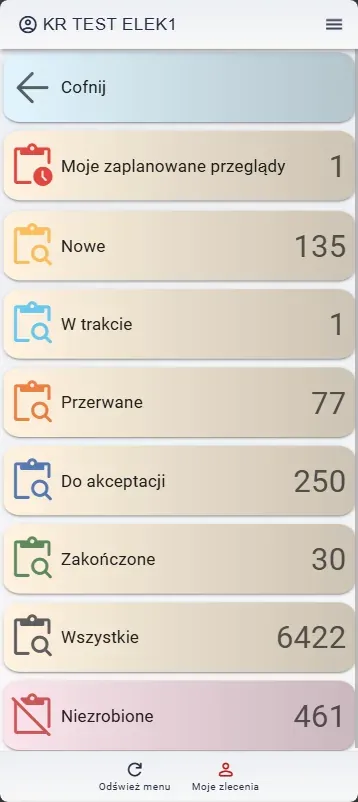
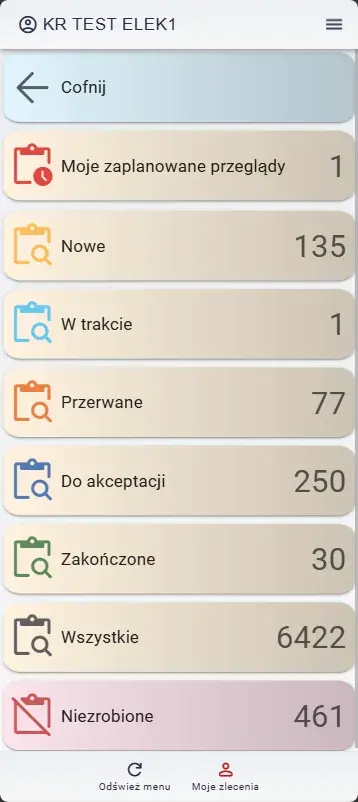
SimplyMobile CMMS mobile app — technician dashboard with work-order counters

Everything maintenance needs

One system instead of spreadsheets and paper — from the request, through work on the floor, to settlement and KPIs.

SimplyMobile in numbers

100+
projects delivered
20+
years of team experience
10,000+
users
millions
devices managed

Trusted by industrial plants

CIRRO Sp. z o.o.PCC Rokita SAKuźnia Jawor SAStock Polska sp. z o.o.Guotai-Huarong (Polska) Sp. z o.o. (GTHR)Mon-TechAssistCo / Spedify
See references →

Explore SimplyMobile CMMS in detail

From the request and inspection, through mobile work on the floor, to reports, prediction and production integrations.

Computerized Maintenance Management System (CMMS)

CMMS is software that contains information on all aspects of maintenance work related to infrastructure and/or equipment.

The main goal of implementing CMMS systems is to automate maintenance activities. This applies to both service and technical departments, as well as all units responsible for ensuring the proper functioning of production processes. By providing easy access to information on equipment maintenance and inventory status, work organization within the enterprise becomes simpler and more efficient. A properly configured CMMS helps prevent unexpected failures and improves communication among key departments of the production plant.

Modern CMMS solutions operate in the cloud, allowing aggregation of critical equipment information within a single database. Technicians can monitor warning signals via mobile devices and respond instantly to malfunctions or failures of individual machines. The ability to quickly identify resource loads allows for adjustments to production schedules and prevents unwanted downtime.

The core components of a CMMS Maintenance Management System include the following modules:

  • Work orders and requests
  • Preventive maintenance tasks (PM module)
  • Work scheduling
  • Equipment register and structure
  • Inventory
  • Technical documentation management
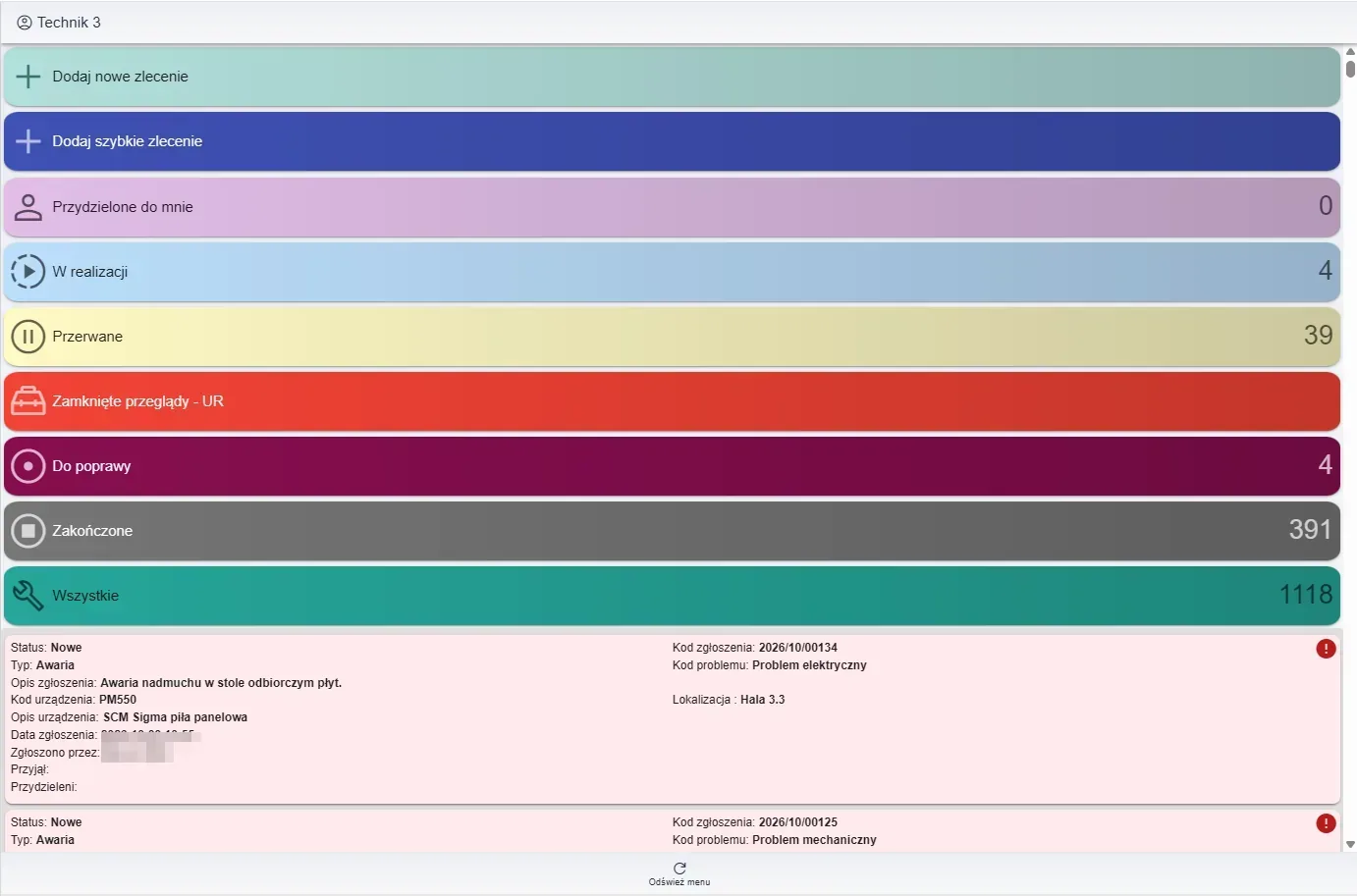
SimplyMobile CMMS mobile app – technician dashboard 'My work orders' with order counts by status
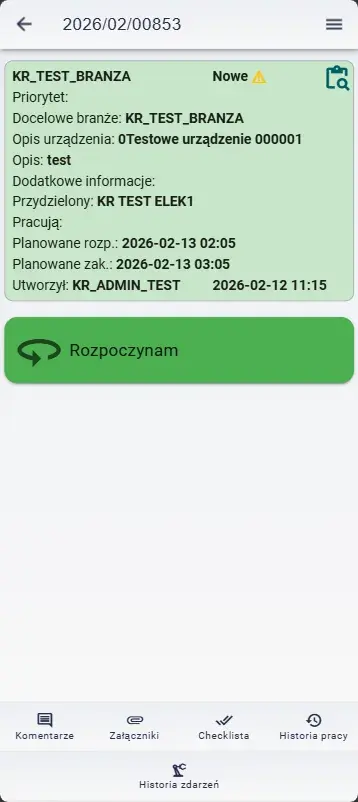
CMMS mobile app – work order details with a start-work button
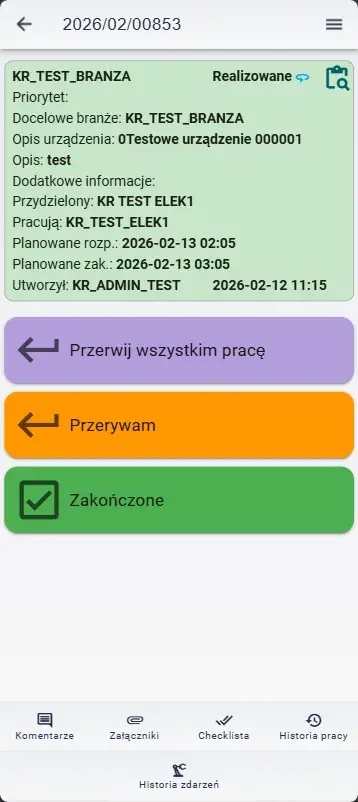
CMMS mobile app – work order in progress with pause and finish options

Additionally, common modules in CMMS Maintenance Management Systems include:

  • Work logging
  • Prediction
  • Supplier management
  • Procurement
  • Work reporting
  • Maintenance and investment projects
  • Contracts
  • Budgeting

Therefore, it is important to remember that which modules to implement in maintenance departments largely depends on the organization’s specific requirements and the existing IT environment.

Finally, it is essential to consider whether the CMMS Maintenance Management System can integrate with other systems such as ERP/SCADA. Such integrations enable synergistic effects and prevent duplication of work across multiple systems.

Based on our many years of implementation experience, we conclude that availability and ease of use are critical elements of CMMS systems. Simple-to-use systems, which require minimal training time, perform best.

By working with simple configurators, technicians do not need extensive knowledge of CMMS systems. Basic computer or mobile device skills suffice. With a clear and highly intuitive interface, data entry by users is fast and efficient.

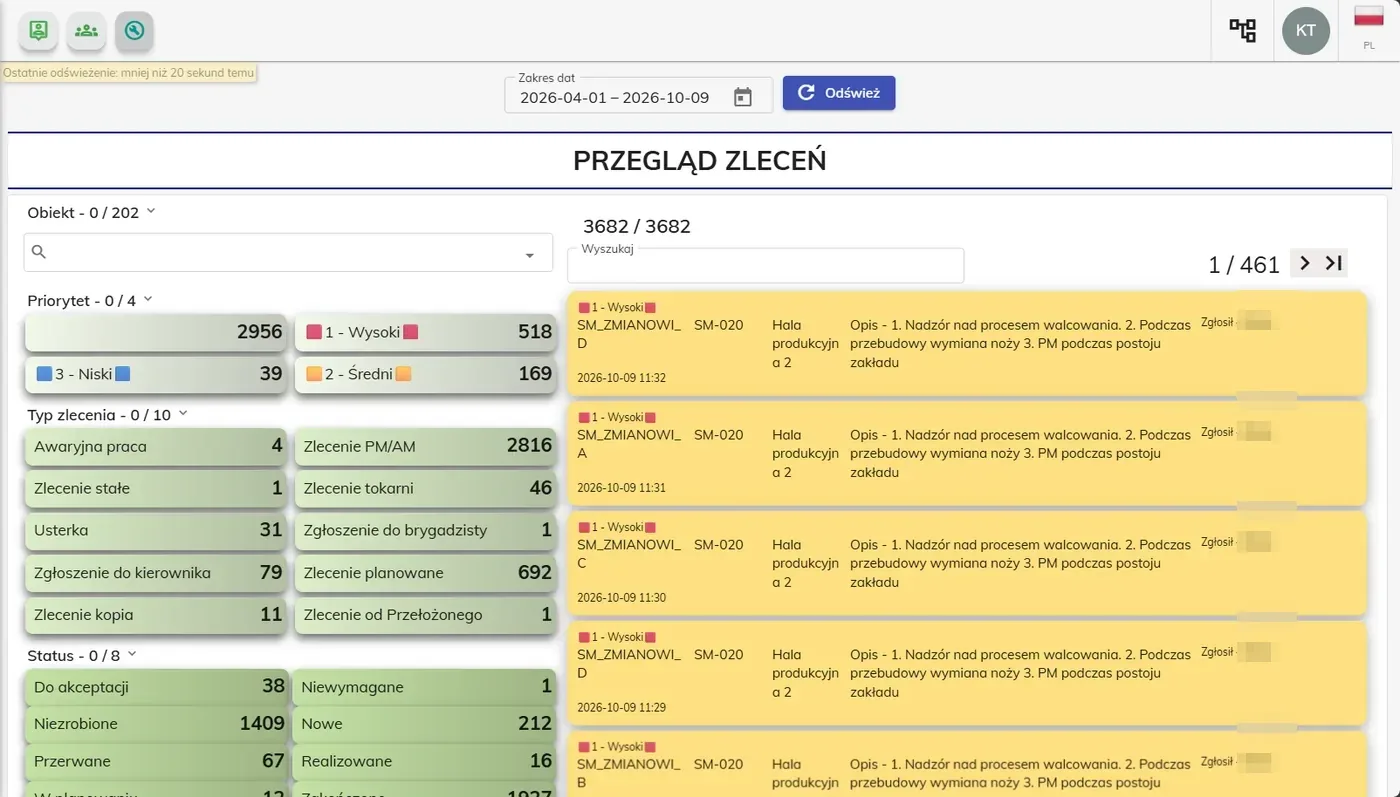
Work-order overview in the CMMS – orders summarized by priority, type and status with a list of high-priority requests
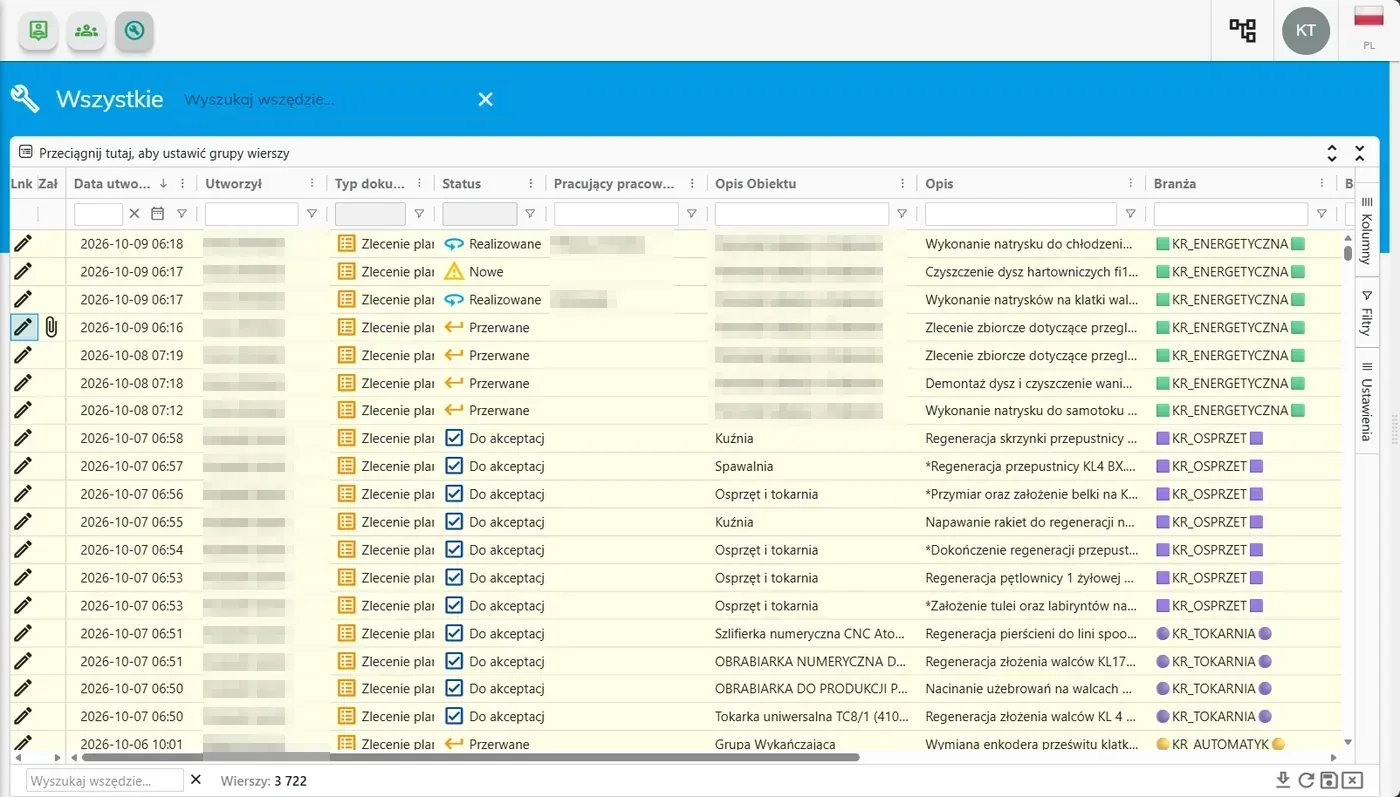
Register of all work orders in the CMMS – a filterable table with date, status, asset and job description

What Characteristics Define a Reliable CMMS System?

Manufacturing plants employ numerous personnel responsible for effective maintenance, so each department must have constant, unrestricted, and easy access to critical information. The deployed CMMS should be intuitive and easy to navigate so that mechanics, technicians, and machine operators have no doubt about the reports and can use them without delay.

A key feature of a reliable CMMS is its operational flexibility. Introducing new technologies in production processes and software should go hand in hand with efficient expansion of CMMS functions. It is also important to apply changes to user accounts quickly. Acquiring desired permissions should happen without unnecessary delays to maintain the existing level of work organization.

Does the CMMS System Integrate with Other Production Plant Systems?

Extensive machine fleets typically operate using multiple systems. This is essential for the efficient organization of all processes in a production facility. Therefore, the CMMS should enable seamless integration with other systems, so that maintenance tasks also contribute to optimizing processes in other departments.

Proper integration and configuration of the CMMS ensure that all systems in a production plant can operate synergistically. This is reflected in seamless data exchange, which facilitates generating effective reports and creating an efficient electronic document workflow.

Who Are CMMS Systems Intended For?

Primarily for those looking to streamline their maintenance department. We will help you acquire a CMMS that facilitates digitization of various areas of your organization, relieving your employees of burdens such as document handling. A well-designed CMMS is not only an excellent tool for maintenance management but also provides strong support for the warehouse, service department, and procurement.

By implementing a CMMS with us, you will find that it is not just an option for large production plants with complex IT infrastructures. We advocate cloud-based solutions, allowing CMMS deployment wherever you need to boost operational efficiency.

Benefits of Having a CMMS System

A CMMS deploys quickly, is easy to use and works in plants of any size. Key benefits:

  • Less downtime — machines are monitored, failures are caught earlier, and production stays continuous.
  • Automated work flow — requests, work orders and confirmations in one place.
  • No more paper — documentation is digital, secure and instantly available (no lost notes).
  • Spare parts always in stock — alerts notify you when the warehouse needs replenishing.
  • Easy to deploy and use — simple configurators, minimal training, works on a computer or mobile device.

Practical Use of the CMMS System

SimplyMobile provides invaluable support to production leaders, machine operators, and maintenance technicians. The CMMS allows easy reporting of breakdowns directly from the production line, significantly reducing the time required to restore operations. Task assignment functionality is essential—progress can be tracked via the appropriate module, and responsible personnel can quickly alert supervisors to any inventory shortages caused by material consumption.

Technician panel on a tablet – quick actions (add order, in progress, completed) and a list of new requests
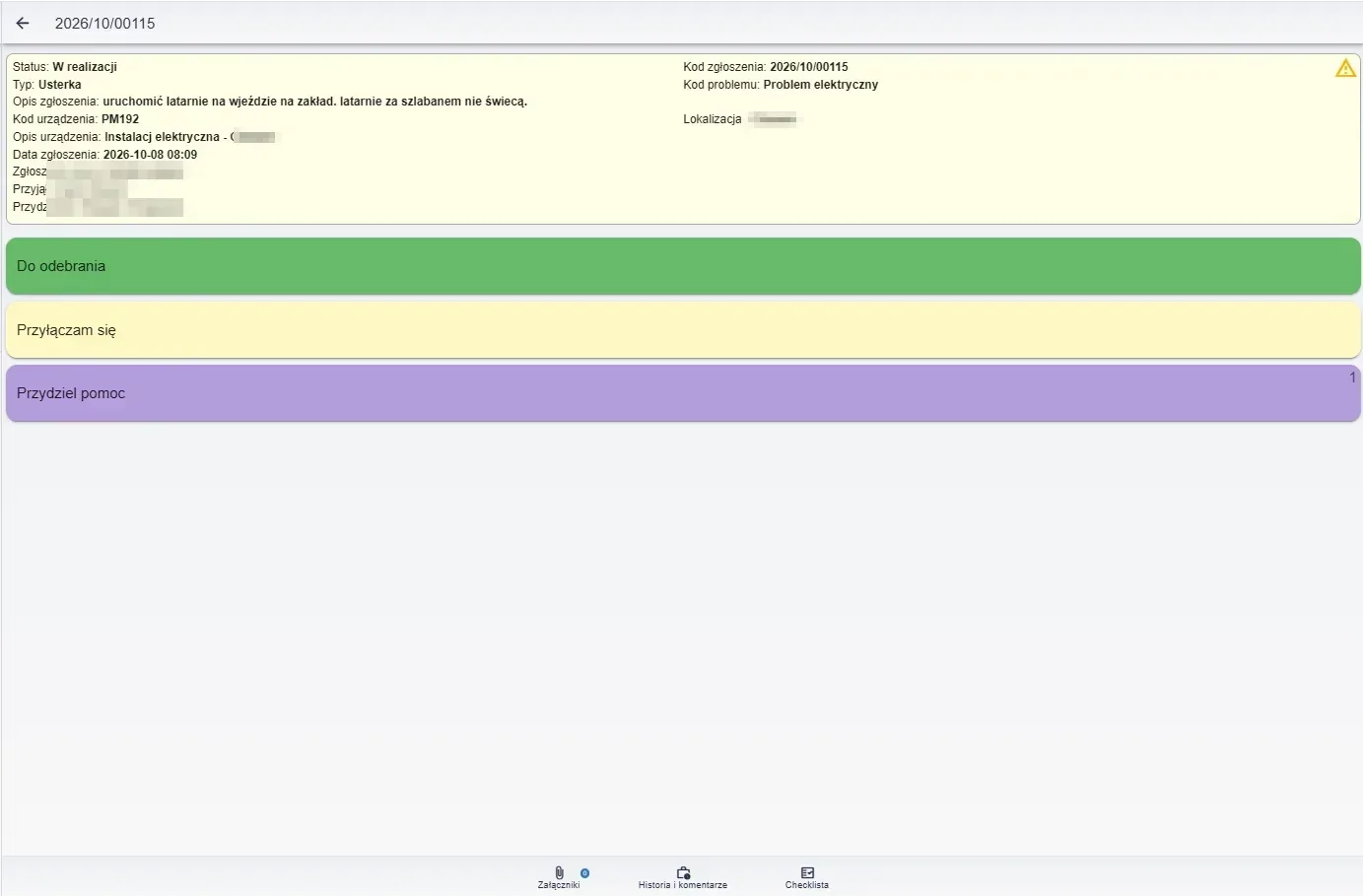
Work order details on a tablet – status, fault description, location, plus attachments, history and checklist

Prediction and AI in the CMMS – the Simply ML module

We extend the SimplyMobile CMMS with our own artificial intelligence module, Simply ML, which brings prediction to maintenance. Machine learning algorithms analyze equipment data and service history, detect anomalies, and forecast potential failures before they occur. This lets you move from reactive repairs to predictive maintenance. The Simply ML module can run both in the Azure cloud and on the client's local servers.

CMMS and MES – integration with production processes

SimplyMobile is an MES/CMMS-class system – it connects maintenance with real-time production oversight. Production planning, shift reporting, and ANDON visualization modules collect data directly from the shop floor, monitor key indicators (including OEE), and link machine downtime to production order execution. Integrating the CMMS and MES layers eliminates duplicate data and gives a complete picture of asset availability and performance.

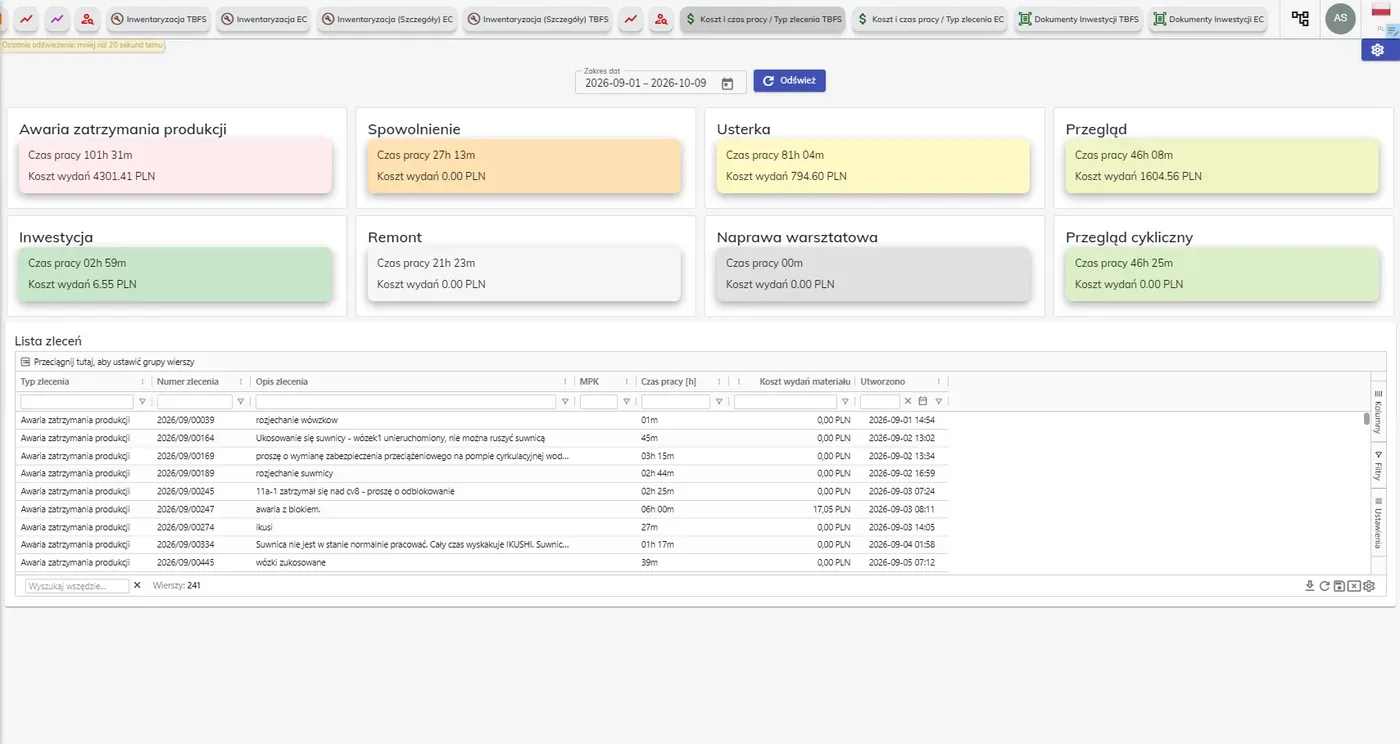
Cost and work-time analysis in the CMMS – broken down by order type (breakdown, inspection, overhaul) with work time and parts cost

CMMS for selected industries

We tailor the CMMS to the specifics of your industry. See our dedicated solutions: CMMS for the chemical industry, CMMS for the food industry and CMMS for heavy industry.

Extensive Reporting Capabilities

The Simply CMMS system enables comprehensive analysis based on available reports as well as custom summaries:

  • Work orders and requests
  • Labor and parts costs
  • Working time
  • Purchases
  • Invoices
  • Plant floor summaries
  • Employee schedules
  • Others
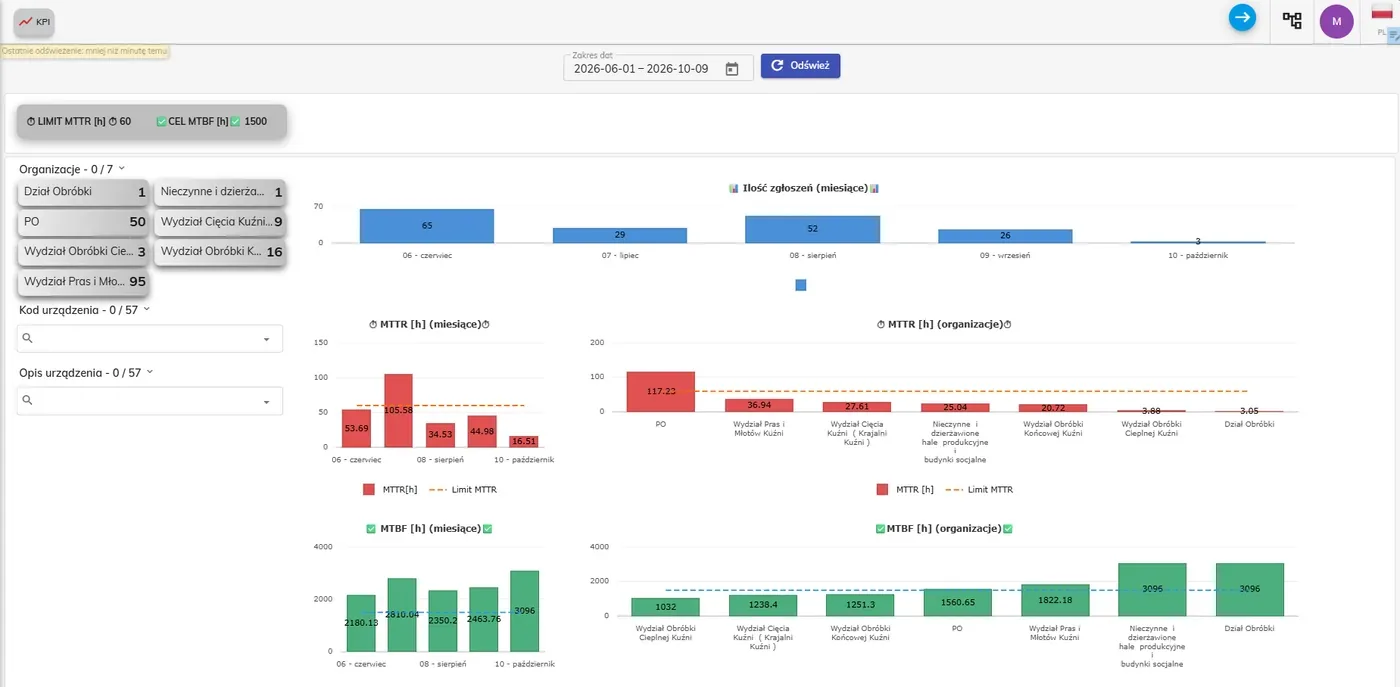
Maintenance KPI dashboard – MTTR and MTBF indicators over time and by organization, with limits and targets
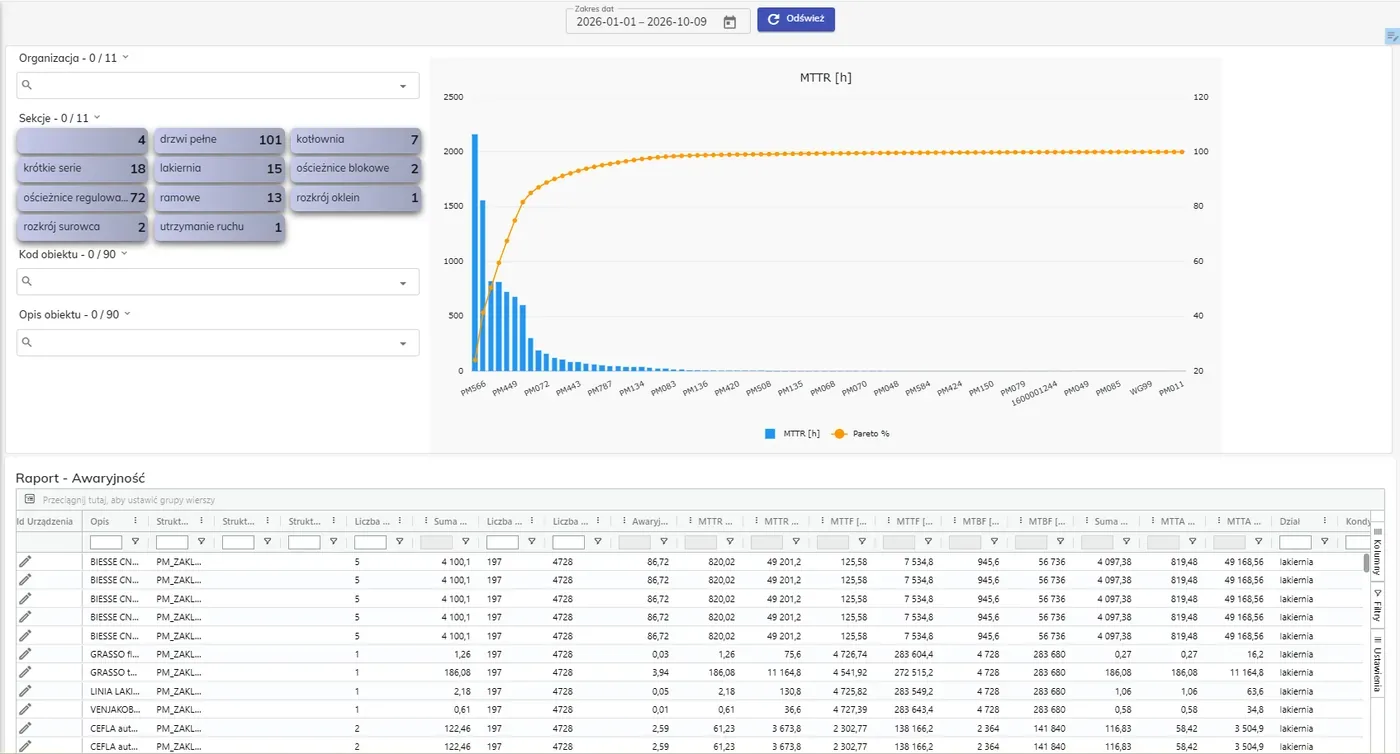
Failure report in the CMMS – an MTTR Pareto chart per asset and a detailed reliability-metrics table (MTTR, MTTF, MTBF)

Rapid CMMS Deployment

We can prepare the system for launch and import initial data very quickly. Thanks to Azure cloud deployment, the application can assist your maintenance department immediately after contacting us.

  • Start with a joint teleconference
  • Select modules that enable a smooth system start
  • Import initial data
  • Brief training
  • Go-live
  • Further system customization
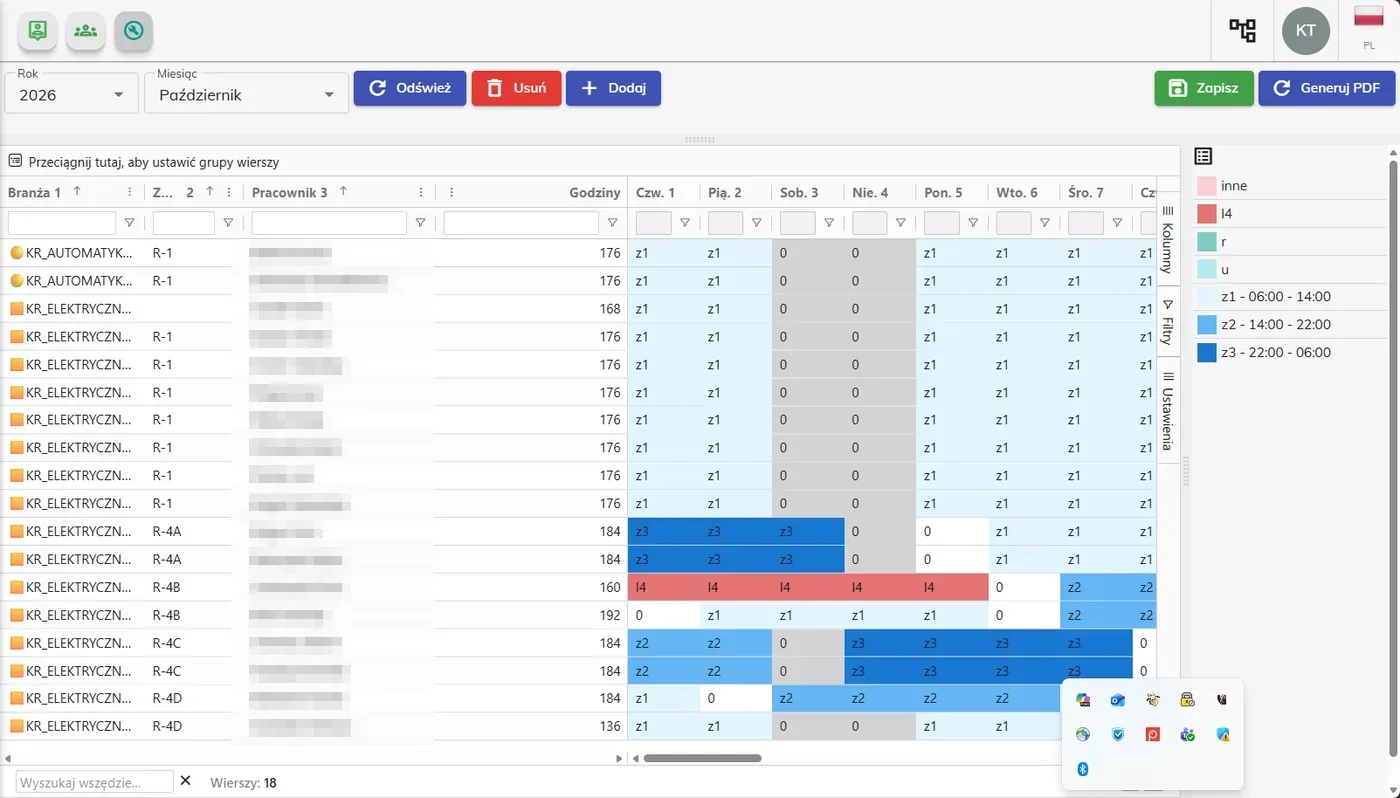
Work schedule in the CMMS – a worker shift roster by team, hours and days

Would You Like to Implement a CMMS or Upgrade Your Existing System?

Keep a few things in mind:

  • The system is only as effective as the data entered
  • The system must allow for very easy data entry
  • Touch panels/mobile devices are essential tools for technicians
  • Work/event logging should be online; late entries do not provide equally valuable analytics

If you want to learn more, contact us.

CMMS vs EAM - how do they differ?

CriterionCMMSEAM
ScopeMaintenance: work orders, PM, spare partsEntire asset lifecycle
GoalMachine efficiency, fewer failuresOptimizing asset costs and value
HorizonOperational (current work)Strategic (long-term)
IncludesWork orders, inspections, inventory, KPIs (OEE/MTTR/MTBF)Everything in CMMS + budgets, hierarchy, compliance, depreciation
Who it's forMaintenance teams, techniciansMaintenance + management, finance, asset management

See SimplyMobile in action

Book a free, no-obligation demo — we'll show the system on your own processes.

Explore SimplyMobile modules

Extend the CMMS with modules tailored to your processes:

Deployments at our customers

Real deployments in the chemical, heavy and food industries.

CIRRO Sp. z o.o. logo

CIRRO Sp. z o.o.

medical equipment service

Deployment:Deployment of a CMMS (web and mobile app) for the Medical Equipment Service team: around 20 field technicians across Poland, access to work orders and device history, remote logging and documentation of service activities, automatic work-time and cost calculation, client sign-off in the app, and full offline mode with synchronization to the ERP system.

We rate the delivered solution, the cooperation during its implementation and the support from SimplyMobile's consultants positively. We recommend SimplyMobile Sp. z o.o. as a proven and competent partner in creating and integrating individually tailored solutions that support the work of field teams, including mobile ones.
— Łukasz Goworek, Service Manager
Download reference letter (PDF)
PCC Rokita SA logo

PCC Rokita SA

chemical industry

Deployment:Deployment of a mobile CMMS with SAP integration (completed in October 2021): infrastructure records with NFC tagging, rounds and inspections confirmed on mobile devices, performance indicators, reports with photos, work order workflow, and management of training documentation and instructions.

We can recommend SimplyMobile as specialists in IT tools that support infrastructure management. The system they delivered meets our expectations, and their flexible approach enabled a smooth rollout of a tool whose use brings us measurable business benefits.
— Bartosz Kocot, Maintenance Manager
Download reference letter (PDF)
Kuźnia Jawor SA logo

Kuźnia Jawor SA

heavy industry (metals)

Deployment:Comprehensive CMMS deployment with ERP IMPULS integration (completed in May 2021): infrastructure asset registration, routine and emergency work, spare parts management, planned work, maintenance work orders, and reporting of indicators (MTBF, MTTR, availability).

In a relatively short time, the deployed system improved the quality of cooperation between our production staff and technical services teams. The data collected enables cross-cutting analyses whose conclusions help us optimize our current maintenance strategy.
— Bartłomiej Nowak, CEO
Download reference letter (PDF)

Contact Us

Need an app, consultation, or support for your CMMS/EAM maintenance systems?

By submitting this form, you consent to the processing of your personal data to handle your enquiry. Details in our Privacy Policy.

Book a demo

FAQ – CMMS System in a Nutshell

  • Why is the CMMS system so popular today?
  • Why should I implement a CMMS in my plant?
  • Is CMMS a solution for small businesses as well?
  • What are CMMS systems most appreciated for?
  • What is the difference between CMMS and EAM systems?