
3D installation viewer — see the whole installation and report a fault in one click
An interactive 3D model of the whole installation in the browser, connected to your CMMS. Click a device and immediately see its data, work-order history and next inspection — and add a report without hunting for a number in tables.
What the 3D viewer is
The 3D viewer is an interactive model of the whole installation — from external networks, through tanks and structure, to sanitary, electrical and process systems. It is built from a BIM/IFC model, runs in the browser and is connected to the CMMS.
Instead of searching for a device by number in a table, you simply click it in the 3D model. You immediately see its data, work-order history and the date of the next inspection — and you add a new report right there.
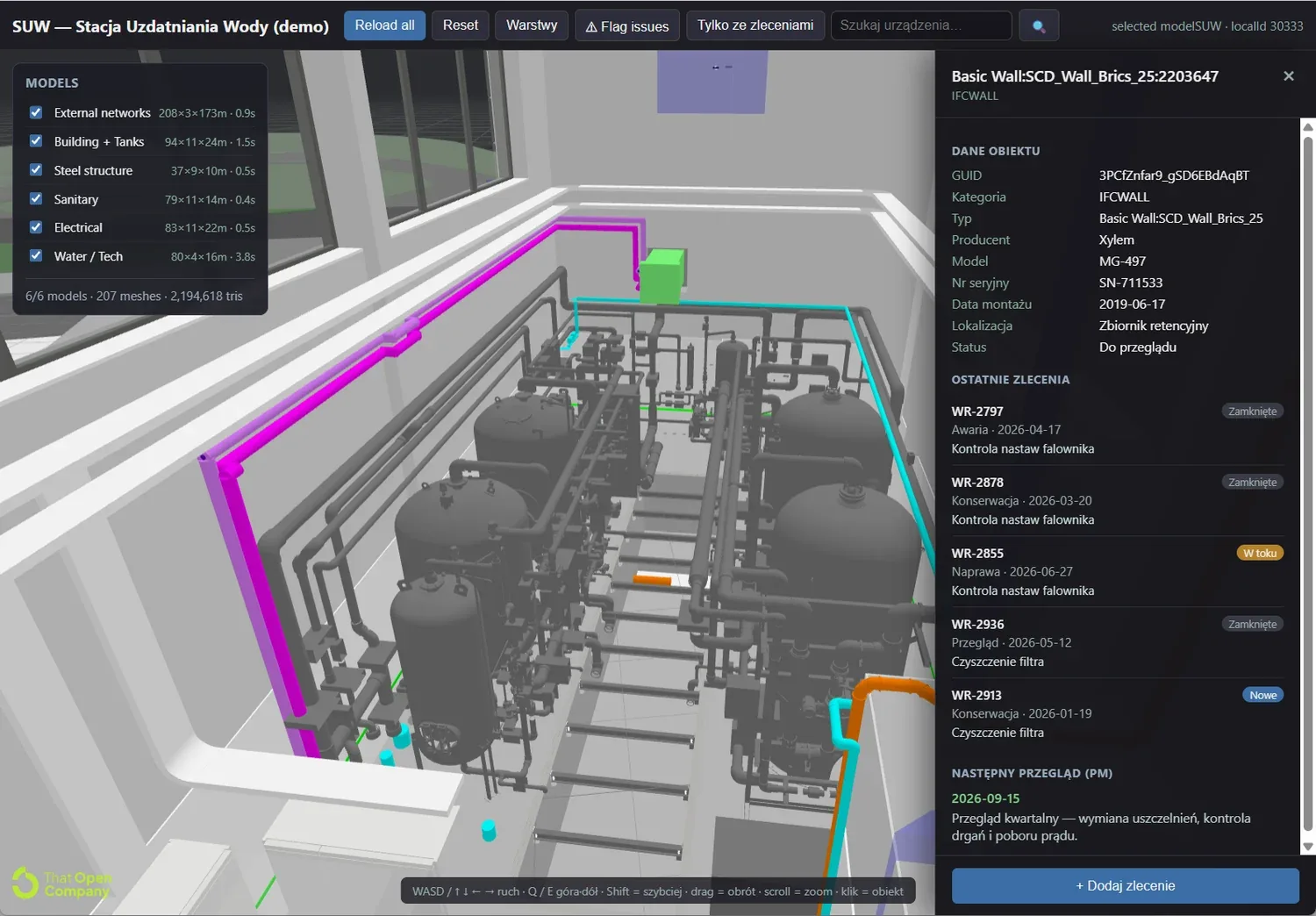
What it enables
- Visualization of the whole installation — every discipline as a separate layer (external networks, building and tanks, steel structure, sanitary, electrical, water/process) that you toggle on and off in one click.
- Fast reporting — click a device in the model and add a work order ('+ Add work order') without looking up an inventory number in tables.
- At-a-glance view of where faults are — colour highlighting and filters ('only with work orders', 'flag issues') show at once which devices have open work orders or a status such as 'to review'.
- Device history — object data (manufacturer, model, serial number, installation date, location), recent work orders (faults, maintenance, inspections) and the next inspection (PM) — all in one panel.
How it works
The model is lightweight and opens in the browser (no install), and the work-order and inspection data comes straight from the CMMS — one source of truth about the installation and assets (see also the initial asset inventory).
Want to see the 3D viewer on your own installation? Book a free demo — we will show the model connected to your work orders and inspections.
Frequently asked questions
- Where does the 3D model come from?
From a BIM model in IFC format (an open standard). We load each discipline as a layer — networks, structure, sanitary, electrical and process systems — so the view mirrors the real installation.
- Do I need to install anything?
No. The 3D viewer runs in the browser — just a link and a login. The model is optimized to open quickly.
- How does it connect to the CMMS?
Every object in the model is linked to a device in the CMMS. On click you see its data, work-order history and next inspection, and you add a new report without leaving the 3D view.
- What installations is it suitable for?
Plants and facilities with extensive infrastructure — e.g. water treatment stations, wastewater plants, process nodes or production halls, where quickly locating a device and its history matters.
- Can I see where faults are?
Yes. Devices with open work orders can be highlighted and filtered ('only with work orders'), and the status (e.g. 'to review') is visible in the panel — so you know at once where to send service.
See SimplyMobile in action
Book a free, no-obligation demo — we'll show the system on your own processes.