
APS Production Planning — A Schedule That Responds to Whatever Happens on the Floor
A spreadsheet won't tell you that a breakdown at one work center has just pushed back three orders — and that one of them will miss its deadline. The APS Planner from SimplyMobile builds the schedule automatically, enforces constraints, and recalculates the plan based on real reports from the shop floor.
What APS planning is and how it differs from planning in Excel
APS (Advanced Planning and Scheduling) is planning that accounts for the real constraints of your plant, not just a sum of hours. Excel will show that it "fits" — an APS plan checks whether that specific work center is actually free at the time, whether it is staffed for the shift, whether the material has arrived, and whether the previous operation has finished.
The APS Planner takes as input the data you already have in your host system (ERP):
- Orders with due dates and priorities (1–10), distinguishing between hard and soft deadlines
- Routings — the sequence of operations (e.g. cutting → welding → painting)
- Resources and their staffing — how many stations or people in a given role can work in parallel
- Work calendars: shifts, weekends, time off, planned maintenance
- Materials: stock levels and delivery dates
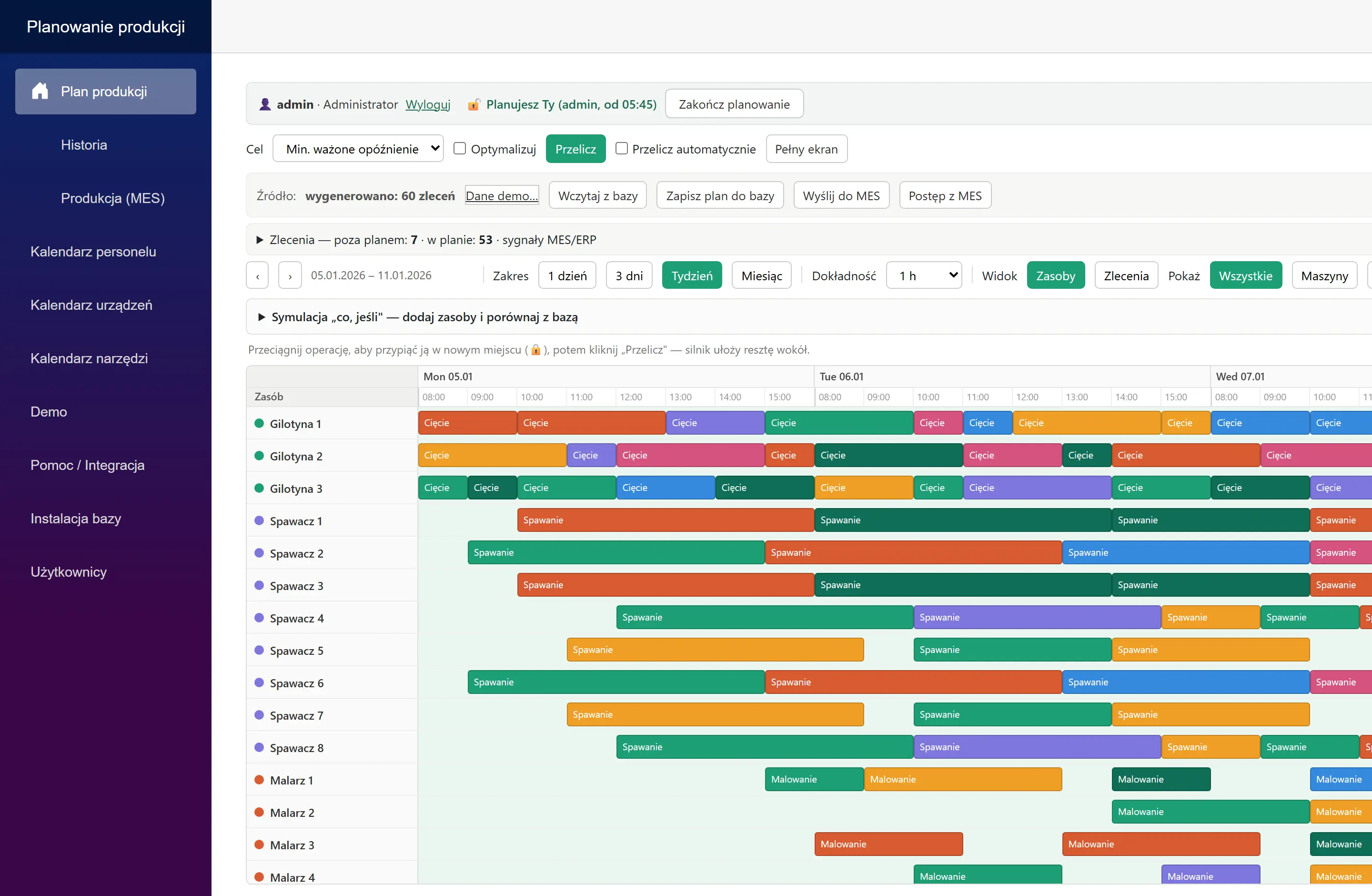
How the plan is built step by step
The algorithm schedules tasks one by one. Each time, it checks what can already start (previous operation complete, material available), picks the most urgent task, and places it in the nearest free slot on the right station — strictly within working hours. An operation that won't fit before the end of the shift pauses and resumes the next day.
Next, the system tests many sequencing variants and keeps the best one for the chosen objective. The planner sets the objective:
- Fewest weighted delays — a late high-priority order "hurts" more than a low-priority one (the default trade-off)
- Maximum on-time orders — what counts is the number of deadlines met
- Shortest total time — closing the batch as early as possible
The result is repeatable: the same data produces the same plan, which matters when agreeing on deadlines with a customer.
The planner stays in charge of the plan
Automation does not take decisions away from people. The planner can move an operation to a specific resource, pin it to a fixed time (the algorithm arranges the rest around it), and compare the "before / after" versions. What-if scenarios are also available — for example, simulating a machine breakdown or a delayed delivery — presented as a proposal to accept or reject.
Three things matter for teamwork:
- Plan locking — one person edits while the others see the plan in read-only mode, so there are never two conflicting versions
- Roles and company sign-in (SSO) — viewer, planner, administrator
- Recalculation history — who recalculated the plan, when, with which objective and what result; a ready-made audit trail of decisions
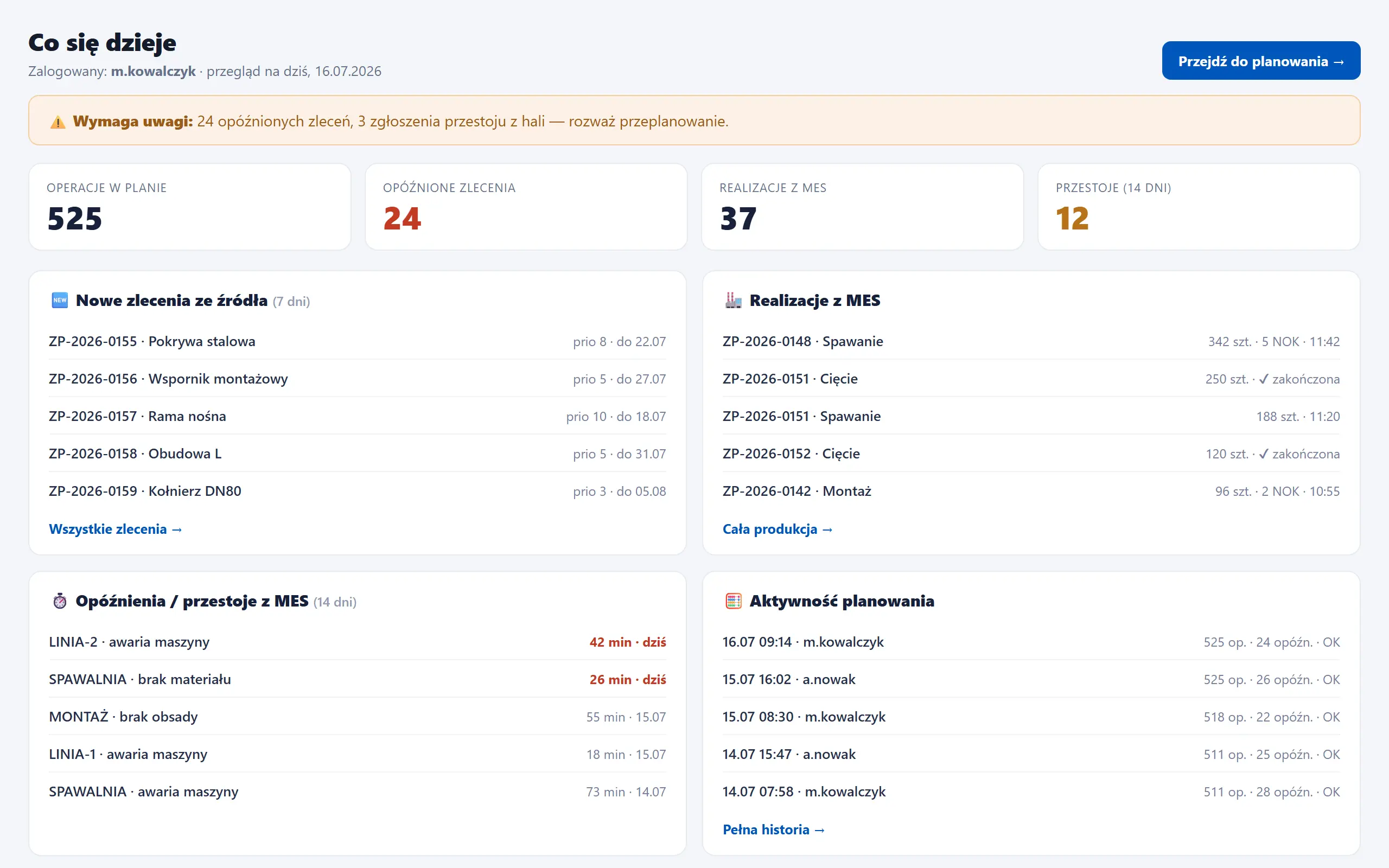
A plan that knows what happened in production
The biggest difference from a static schedule: the plan is updated with data from the floor. The MES system feeds back information about what has already been done and what has stalled:
- Completed operations drop out of the puzzle — they are never scheduled a second time
- A reported downtime lowers the station's available capacity for that day, so after a recalculation the operations shift forward on their own
- After logging in, the planner sees a "what's happening" dashboard: new orders, production feedback, delays and recent recalculations — and instantly knows whether to react
A practical example: a work center runs 20 pcs/h and a breakdown lasted 30 minutes. That is about 10 pieces less capacity that day — the daily plan itself shows which tasks need to move, instead of waiting until the end of the week for an after-the-fact reckoning.
The approved schedule flows back to the host system and reaches the stations in MES, so the operator's work queue matches the plan.
What the plant gains
- Faster response to disruptions — replanning instead of firefighting
- Realistic deadlines for customers, based on resource availability rather than optimism
- Visibility into metrics: how many orders are on time, how many are late, when the whole thing closes
- Less manual work for the planner and fewer "plans in one person's head"
- Better capacity utilization — you can see where the bottleneck is and where there is slack
You can read more about the module itself on the APS production planning page, and about how the plan works with the floor in the description of the ERP–Planner–MES architecture. If you are interested in the metrics side, take a look at the metrics.
Summary
APS production planning makes sense when the plan is alive: it accounts for constraints, shows the consequences of decisions, and updates itself as reports come in from production. Want to see how your orders would lay out across your resources? Book a demo — we'll show you the full loop from order to settlement.
See SimplyMobile in action
Book a free, no-obligation demo — we'll show the system on your own processes.